
The NFRs That Will Kill Your SaaS If You Ignore Them
By A. Perico
12 min read
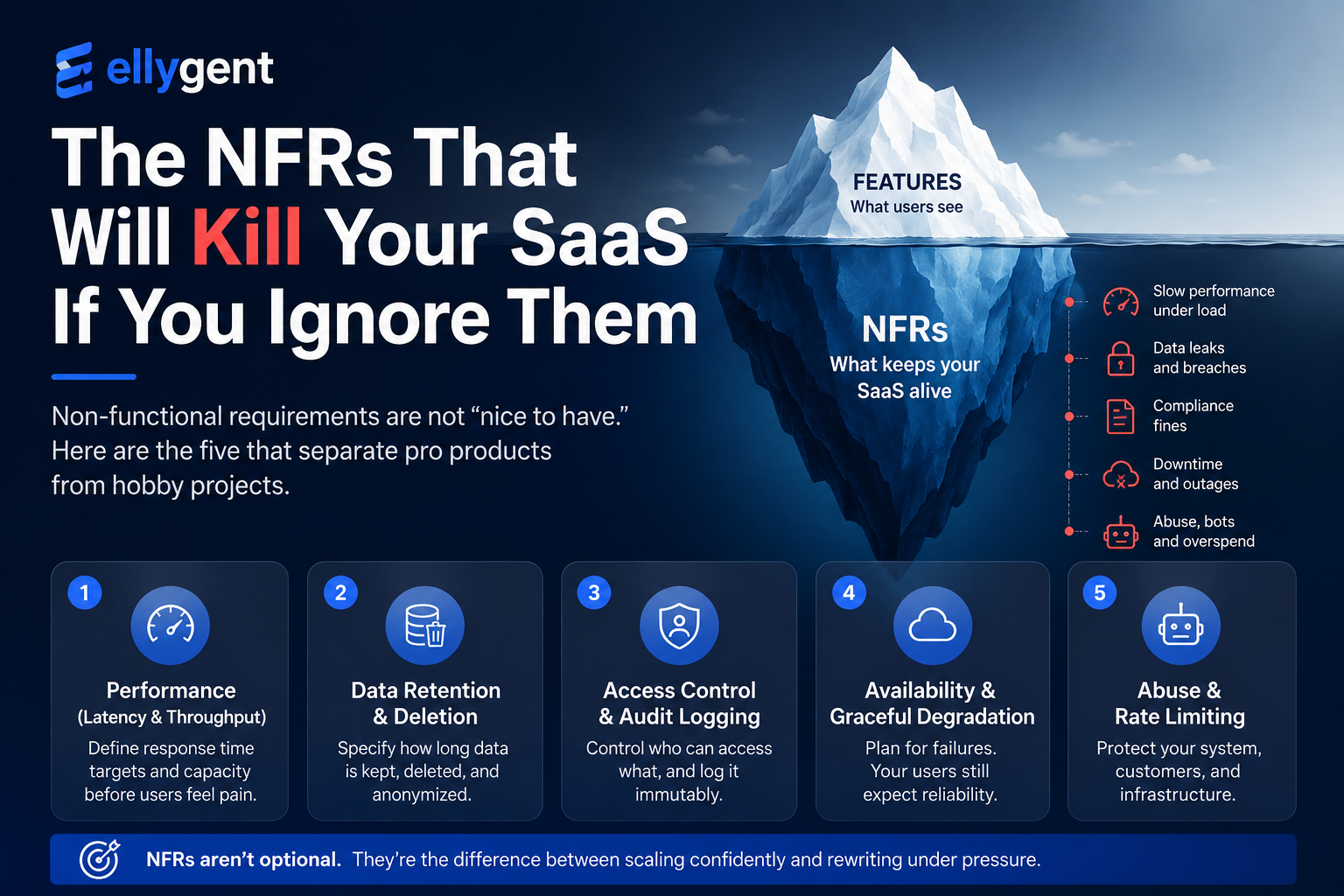
Non-functional requirements are not nice-to-have. Performance, security, retention, availability, and abuse protection are the difference between a SaaS product that scales and one that gets rewritten under pressure.
Turn Systems Engineering context into delivery alignment.
Ellygent helps teams define system intent, structure engineering context, maintain traceability, and make approved context usable across implementation and AI-assisted workflows.
The NFRs That Will Kill Your SaaS If You Ignore Them
You launch.
Users like the product. The core features work. The first customers are happy. The team feels momentum.
Then reality starts testing the parts nobody specified.
 ...
...
Week 3:
The dashboard becomes painfully slow when one customer imports a large dataset.
Someone asks:
“Did we ever define expected query performance?”
No.
Month 2:
A workspace admin exports more customer data than they should have been allowed to access.
Someone asks:
“Where is the access control requirement for exports?”
It does not exist.
Month 4:
A customer asks how long deleted user data remains in backups.
Someone asks:
“Do we have a data retention requirement?”
Not really.
Month 6:
The payment provider is unavailable for 20 minutes, and subscription changes fail halfway.
Someone asks:
“What should the system do when billing is down?”
Nobody defined it.
These are non-functional requirements.
Performance. Security. Privacy. Retention. Availability. Auditability. Scalability. Recoverability. Abuse protection.
The “-ilities.”
Everyone assumes them. Almost nobody writes them early enough.
And for SaaS products, that is dangerous.
Because non-functional requirements are not decoration. They are not “enterprise stuff” you add later. They are the difference between a product that can grow and a product that gets rewritten under pressure.
Functional requirements describe what the product does
A functional requirement says:
“The user can export workspace data.”
Good.
But that is only part of the story.
The real product question is bigger:
- How fast should the export be generated?
- Who is authorized to export?
- What data is included?
- What data is excluded?
- Is the export audited?
- How long is the file retained?
- Is the download link reusable?
- What happens if the export job fails?
- What happens if the user has no permission anymore?
- What happens if someone abuses the endpoint?
Those are not edge decorations.
Those are product behavior.
If you ignore them, the system still makes decisions. They are just accidental decisions made by whoever implements the feature first.
That is the problem with missing NFRs.
The team does not avoid the decision.
It only makes the decision implicitly.
Why SaaS teams ignore NFRs
Small software teams usually do not ignore NFRs because they are careless.
They ignore them because the pressure is on features.
Ship login. Ship billing. Ship dashboards. Ship exports. Ship invites. Ship reporting. Ship integrations.
Everything visible gets priority.
Performance, retention, audit logs, availability, and abuse protection feel like things you can improve later.
Sometimes that is true.
But often “later” means:
- after the first serious customer complaint
- after the first enterprise security questionnaire
- after the first compliance review
- after the first database performance incident
- after the first data deletion request
- after the first API abuse incident
- after the first customer asks for audit evidence
At that point, the NFR is no longer cheap.
Now it is tied to architecture, database design, permissions, logging, background jobs, support processes, and customer trust.
That is why SaaS teams need lightweight systems engineering.
Not heavy process.
Just enough structure to ask:
What qualities must this feature have to be safe, scalable, supportable, and trustworthy?
Five NFRs that can kill a SaaS product
There are many non-functional requirements, but these five are especially dangerous to ignore in SaaS.
1. Performance: latency and throughput
The vague version:
“The dashboard should be fast.”
This is not a requirement.
It is a wish.
Fast for whom? Under what load? For which operation? With how much data? Measured where? Average or percentile? Cold cache or warm cache? Single user or many users?
A better requirement:
NFR-PERF-001 The system shall return 95% of workspace dashboard API requests within 300 ms when the workspace contains up to 50,000 records and the service is handling 1,000 requests per minute.
This is much better because it defines:
- operation
- percentile
- response time
- data volume
- load condition
- measurable outcome
Now engineering can design for it. QA can test it. Product can understand the tradeoff. Support can explain expected behavior. AI can help reason about performance because the target is specific.
Without this, “fast” becomes a moving target.
And moving targets become rework.
2. Data retention and deletion
The vague version:
“Users can delete their account.”
That sounds functional. But for SaaS, deletion is rarely just a button.
You need to define what deletion means.
Does the account disappear immediately? What happens to billing records? What happens to audit logs? What happens to user-generated content? What happens to backups? What is anonymized? What is retained for legal or accounting reasons? What happens if the user belongs to multiple workspaces?
A better requirement:
NFR-DATA-001 Upon account deletion, personally identifiable information shall be anonymized in active application databases within 48 hours, except records that must be retained for legal, billing, audit, or security purposes.
Another one:
NFR-DATA-002 Deleted user data shall be permanently removed from recoverable backups within 90 days according to the backup retention policy.
This is where many SaaS teams get surprised.
Deletion is not only a UI action.
It is a data lifecycle requirement.
If you do not define it early, you may later discover that your architecture cannot easily support what your customers, contracts, or regulations require.
3. Access control and audit logging
The vague version:
“Only admins can see billing info.”
Better than nothing, but still shallow.
Which admins? Workspace admins? Organization owners? Support admins? Internal staff? Read-only admins? Billing admins?
And what does “see” mean?
View invoices? Download invoices? Change payment method? Cancel subscription? Export billing history? View tax information?
Access control needs precision.
A better requirement:
NFR-SEC-001 The system shall restrict access to billing records to users with the Workspace Owner or Billing Admin role for the associated workspace.
Audit logging also needs to be explicit:
NFR-AUD-001 The system shall record an audit event for each access to billing records, including user ID, workspace ID, resource ID, action, timestamp, and request origin.
And if audit logs matter to your market, add retention:
NFR-AUD-002 Billing access audit logs shall be immutable to standard application users and retained for at least 12 months.
This is not only for regulated companies.
Any SaaS product with teams, roles, billing, customer data, exports, admin actions, or sensitive workflows should care about access control and auditability.
Because when something goes wrong, the first question is usually:
“Who did what, and when?”
If the system cannot answer that, you have a trust problem.
4. Availability and graceful degradation
The vague version:
“We need high availability.”
Again, this sounds good, but it is not enough.
Availability is not only uptime percentage.
It is also behavior under partial failure.
What happens when:
- the payment provider is down?
- email delivery fails?
- the AI provider times out?
- the file storage service is unavailable?
- the analytics pipeline is delayed?
- the background worker queue is overloaded?
- the database replica is behind?
- the third-party integration returns inconsistent data?
A better requirement:
NFR-AVAIL-001 If the payment provider is unavailable when a user requests a subscription change, the system shall queue the requested change, mark it as pending, retry processing with exponential backoff for up to 24 hours, and notify the user when the change is completed or fails permanently.
That requirement makes a real product decision.
It defines:
- what happens during provider failure
- whether the request is lost or queued
- how the user is informed
- how long retry continues
- what final failure means
Without this, developers invent behavior under pressure.
And under pressure, systems often end up with partial states.
Partial states are expensive.
5. Abuse protection and rate limiting
The vague version:
“Prevent API abuse.”
This is too vague to implement well.
Abuse of what? By whom? At what threshold? What response is returned? Is the event logged? Is the key suspended? Is the user notified? Does the limit apply per user, workspace, IP, API key, or organization?
A better requirement:
NFR-ABUSE-001 Each API key shall be limited to 100 requests per minute per workspace. Requests exceeding this limit shall return HTTP 429 and shall not be processed.
Add observability:
NFR-ABUSE-002 The system shall log rate-limit violations with API key ID, workspace ID, timestamp, endpoint, and request count.
Add escalation if needed:
NFR-ABUSE-003 If an API key exceeds the rate limit more than 10 times within one hour, the system shall flag the key for review and notify the workspace owner.
This is not overengineering.
This is defining the product boundary.
A SaaS product without abuse protection can become expensive very quickly.
One bad integration, one accidental loop, one leaked API key, or one malicious script can create real cost.
The pattern: vague words hide engineering decisions
Most dangerous NFRs start as vague words:
Vague wordWhat it should become Fastlatency, throughput, percentile, load, data volume Securepermissions, encryption, tokens, audit logs, access checks Reliableretries, failure handling, recovery time, data consistency Scalableexpected users, records, traffic, tenants, storage growth Availableuptime target, degradation behavior, provider failure handling Privatedata minimization, retention, deletion, consent, access rules Auditableevent types, log fields, immutability, retention period Robustedge cases, failure modes, idempotency, concurrency handlingThis is the core problem.
Teams write adjectives.
Systems need measurable behavior.
A simple SaaS NFR checklist
You do not need a huge process to start.
For every important feature, ask these questions.
Performance
- What response time matters?
- Under what load?
- With how much data?
- Is this average, p95, or p99?
- What happens if the operation takes longer?
Security and access control
- Who is allowed to do this?
- Which role or permission is required?
- Is permission checked only at the start or also before completion?
- Are failed attempts logged?
- Can internal staff access this data?
Privacy and retention
- What personal data is touched?
- How long is data retained?
- What happens when the user deletes the account?
- What remains in backups?
- What must be anonymized?
Auditability
- Which actions must be logged?
- What fields must the audit event include?
- Who can view audit logs?
- How long are logs retained?
- Can logs be modified?
Availability and recovery
- What happens if an external provider fails?
- Is the request retried, queued, rejected, or marked pending?
- What does the user see?
- How does support investigate the failure?
- What is the recovery expectation?
Abuse and rate limiting
- What usage pattern is considered abusive?
- What limit applies?
- Is the limit per user, workspace, API key, IP, or organization?
- What response is returned?
- Is the event logged or escalated?
Data consistency
- What happens if two users change the same record?
- What happens if an operation partially succeeds?
- Is the operation idempotent?
- What is the source of truth?
- How is reconciliation handled?
This checklist is not bureaucracy.
It is a way to prevent expensive surprises.
Example: “Export workspace data”
Let’s apply the checklist to a simple SaaS feature.
Functional requirement:
The system shall allow authorized workspace users to export workspace data as a CSV file.
Now add NFRs.
Performance
The system shall generate CSV exports containing up to 100,000 records within 60 seconds under normal operating load.
Access control
The system shall allow exports only for users with the Workspace Owner or Export Data permission.
Data scope
The export shall include only records owned by the workspace and visible to the requesting user’s permission scope.
Audit logging
The system shall record an audit event when an export is requested, completed, downloaded, or failed.
Retention
Generated export files shall be deleted automatically after 24 hours.
Security
Export download links shall use signed, single-use tokens and shall expire after 24 hours or one successful download, whichever occurs first.
Abuse protection
A workspace shall be limited to five export requests per hour.
Now the feature is much clearer.
Without these NFRs, “export data” is too risky.
With them, developers know what to build, testers know what to verify, and product owners know what behavior they are accepting.
What happens when NFRs are ignored
Here is a common scenario.
A SaaS team builds admin exports quickly.
At first, it works.
Then an enterprise customer asks:
- Can you prove who exported customer data?
- Can you show what was exported?
- Can you restrict exports to specific roles?
- Can download links expire?
- Can users request deletion?
- Can exports be removed from storage?
- Can you prevent repeated bulk export abuse?
If the team never defined these requirements, the answer becomes:
“Not yet.”
Now the feature has to be rebuilt.
Not because the original export button was hard.
Because the quality attributes around the export were never designed.
This is how NFRs kill SaaS products.
Not always immediately.
But slowly, through trust gaps, scaling pain, compliance friction, support burden, security concerns, and customer blockers.
Where AI helps
AI can help generate NFRs.
But only if it has context.
If you ask:
“Write NFRs for a SaaS product.”
You will get a generic checklist.
Some of it may be useful. Much of it will be too broad.
If you give AI the actual feature context:
- user
- workflow
- data touched
- roles and permissions
- external services
- expected load
- business risk
- customer type
- retention expectations
- verification approach
Then AI can help derive useful NFRs.
For example:
“For this data export workflow, identify performance, access control, audit logging, retention, abuse protection, and failure handling requirements.”
That is a much better prompt.
But the quality still depends on the context.
That is why Ellygent does not treat AI as a magic writer.
Ellygent structures the engineering context first.
Then AI can help derive and review requirements more responsibly.
How Ellygent helps with SaaS NFRs
Ellygent helps teams define the product before writing isolated requirements.
For SaaS teams, that means connecting:
- product problem
- users and stakeholders
- workflows
- product capabilities
- functional requirements
- non-functional requirements
- risks
- acceptance criteria
- verification methods
- traceability
An NFR should not live as a forgotten checklist item.
It should be connected to the feature, workflow, risk, and test that make it necessary.
For example:
Workflow:
Admin exports workspace data.

Risk:
Sensitive customer data may be exposed or retained too long.

NFR:
Export download links shall be signed, single-use, and expire after 24 hours.

Verification:
Attempt reuse after first download; attempt download after expiration; attempt access from unauthorized user.
Now the requirement has context.
It is not just “secure.”
It is a specific control against a specific risk in a specific workflow.
That is where AI-assisted requirements become useful.
Not because AI invents impressive text.
Because the system definition gives AI something real to work with.
A five-minute exercise
Pick one important SaaS feature.
Maybe:
- invite users
- export data
- change subscription plan
- upload documents
- connect an integration
- create an API key
- approve a workflow
- generate an AI response
Now ask:
- What performance expectation matters?
- What roles and permissions apply?
- What data is touched?
- What needs to be audited?
- What should be retained or deleted?
- What happens if an external service fails?
- What abuse pattern should be prevented?
- What test proves each of these?
In five minutes, you will probably find at least three NFRs that were missing.
Those missing NFRs are not “future work.”
They are hidden product decisions.
Final thought
A SaaS product is not professional because it has many features.
It is professional because it behaves correctly under real conditions.
Under load. Under failure. Under misuse. Under permission boundaries. Under customer scrutiny. Under privacy expectations. Under integration problems.
That is what non-functional requirements define.
They are not nice-to-have.
They are the product quality contract.
If you ignore them, the system will still make decisions.
It will just make them accidentally.
And accidental quality does not scale.
So before you ship the next important SaaS feature, do not only ask:
“What should it do?”
Also ask:
“How well must it do it, under which conditions, for whom, with what controls, and how will we prove it?”
That is not bureaucracy.
That is professional software engineering.
Define the system. Give AI real context.
Related Ellygent workflows
Connect this topic to product workflows for system definition, traceability, export, and AI-assisted engineering.
About the author
A. Perico writes about Systems Engineering definition, traceability, AI-assisted engineering workflows, and ways to keep implementation aligned with approved system context.
Define system context with Ellygent.
See how Ellygent supports Systems Engineering workflows from definition through traceability, baselines, and context export.